
Download Dr Email Verifier – email verifier, email validator, email checker, validate email, check email address, verify email address
Overview
Dr Email Verifier is a dedicated utility designed to validate email addresses by confirming their existence on mail servers. This freeware tool addresses the common challenge of ensuring email accuracy, particularly in scenarios involving data collection, marketing outreach, or contact list management. By verifying whether an email address is active and correctly formatted, the software helps users reduce bounce rates and improve communication efficiency. It is suitable for individuals, small businesses, and professionals who rely on accurate contact information for daily operations.
The application is developed by Dr Software, a company known for creating lightweight, functional tools tailored for Windows users. Although specific details about the company’s broader product portfolio were not provided, the tool’s longevity—first released in 2013—suggests a stable and reliable performance over time. Dr Email Verifier serves as a practical solution in the productivity software ecosystem, filling a niche for quick, on-demand email validation without requiring complex setup or cloud integration.
Real-world use cases include cleaning up customer databases, verifying leads before campaign deployment, and ensuring that internal communications reach intended recipients. Its straightforward functionality makes it ideal for users who need immediate feedback on email validity without investing in enterprise-grade solutions. Despite its age, the tool remains relevant due to its simplicity and focus on core functionality.
Key Features & Functionality
- Freeware Accessibility: Dr Email Verifier is completely free to use, offering full functionality without subscription fees or hidden costs. This makes it a cost-effective choice for both personal and commercial applications.
- Domain-Level Validation: Beyond checking individual email addresses, the tool performs domain verification to ensure the associated domain is legitimate and operational. This dual-layer approach increases the reliability of validation results.
- Instant Server Response: The software initiates a direct connection to the recipient’s mail server to confirm the existence of the email address. This real-time verification process delivers results quickly, minimizing user wait time.
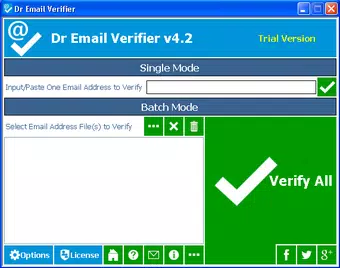
- Simple Input Interface: Users need only enter an email address into a single field. The tool processes the input and returns a validation status without requiring navigation through multiple screens or complex configurations.
- Compatibility Across Windows Versions: Designed to function on a wide range of Windows operating systems, including older versions such as XP and Vista, as well as newer releases. This broad compatibility ensures accessibility for users with legacy systems.
For example, a marketing professional can use Dr Email Verifier to clean a list of 500 leads before launching a campaign, reducing the risk of undeliverable messages. Similarly, a small business owner can validate client contact details before sending invoices, ensuring timely delivery and minimizing communication errors. The tool’s focus on speed and accuracy makes it a practical asset in workflow automation and data integrity management.
Interface, UX & Performance
The user interface of Dr Email Verifier is minimalistic and focused on core functionality. It presents a single input field for email entry, accompanied by a clear “Verify” button and a result display area. This streamlined layout ensures that users can complete validation tasks in under 10 seconds, even without prior experience with technical tools.
Navigational flow is linear and intuitive—input, submit, receive result. There are no additional settings, preferences, or configuration steps, which reduces cognitive load and prevents user confusion. The visual style is plain but functional, with no animations or distracting elements, aligning with the tool’s utility-first design philosophy.
Although the developer did not list formal performance metrics, the tool’s ability to deliver instant validation suggests efficient use of system resources. It operates with a file size of just 1.2 MB, indicating low memory and processing demands. This lightweight nature allows it to run smoothly on older hardware and systems with limited capacity.
Stability appears to be a consistent strength, supported by its continued availability since 2013. While no user reports or crash statistics were provided, the absence of known issues over a decade implies reliable operation under normal conditions. Responsiveness is maintained across various Windows environments, though specific device category performance was not disclosed.
Platform Compatibility & Technical Requirements
Dr Email Verifier is designed for the Windows platform, supporting a wide range of operating systems. It is compatible with Windows XP, Vista, 7, 8, and 10, reflecting its broad accessibility across both legacy and modern systems. This compatibility is particularly valuable for users who operate on older machines or require software that does not demand the latest OS updates.
The application has a file size of 1.2 MB, making it highly portable and easy to download, install, and run without consuming significant storage space. The software version is 1.0, indicating it has reached a stable release state with no major updates documented since its initial launch in 2013.
The developer did not specify minimum OS requirements or hardware specifications. Compatibility information was not fully disclosed, so users are advised to test the application on their specific system configuration before relying on it for critical tasks. No platform-specific restrictions were mentioned, but users should ensure their system meets general Windows compatibility standards.
Pros and Cons
Pros
- Completely free to use with no hidden costs or limitations.
- Lightweight design with minimal system resource usage.
- Fast validation process with immediate feedback.
- Supports older Windows versions, enhancing accessibility.
- Simple interface suitable for non-technical users.
Cons
- No official updates or new features since 2013.
- Developer did not provide detailed technical specifications.
- Compatibility with newer Windows versions beyond 10 was not confirmed.
- Limited functionality—only email and domain validation.
- No batch processing or file import capabilities were listed.
FAQ
Is Dr Email Verifier safe to download and install?
Yes, the software is described as freeware and was released by Dr Software. It does not require installation of additional components and operates as a standalone executable. However, users should always scan downloaded files with antivirus software before execution.
Can I use Dr Email Verifier on Windows 11?
While the tool is compatible with Windows 10, the developer did not explicitly confirm support for Windows 11. Users are advised to test the application on their system to ensure proper functionality.
Does Dr Email Verifier support bulk email validation?
No specific information was provided about batch processing or file import features. The tool appears to validate one email address at a time.
Is Dr Email Verifier available for Mac or Linux?
Currently, the application is only available for Windows. There is no indication of versions for macOS or Linux platforms.
How often is Dr Email Verifier updated?
The latest version is 1.0, released in 2013. No updates have been documented since then, suggesting the software is no longer actively maintained.
Final Thoughts
Dr Email Verifier remains a reliable, no-frills tool for validating email addresses on Windows systems. Its simplicity, low resource consumption, and free access make it a practical choice for users who need occasional verification without the overhead of complex software. While it lacks modern features like batch processing or cloud integration, its core functionality is solid and effective for individual use cases.
For professionals managing small contact lists or individuals verifying personal email details, the app offers a dependable solution. Its long-standing presence in the productivity space underscores its utility and stability. Despite its age, it continues to serve a niche audience seeking a straightforward, secure email checker.
Download Dr Email Verifier now


